
Browser Push Notifications — From Zero to Crash in All Browsers
Have you ever felt annoyed every time you have to manually check whether your new article has been published? Or do you want to let subscribers know that there is new content without them having to open the website first? Well, that's the problem I want to solve with this plugin.
Browser push notification is a technology that allows websites to send notifications directly to the user's browser — similar to notifications from cellphone applications, but simply via the browser. On desktop, notifications appear in the bottom right corner. On iOS, it appears like a normal application notification. And what's cool: users don't need to open the website first.
Basic Web Push Concepts
Before discussing the plugin, I want to tell you a little about how the Web Push API works. There are three actors here:
- Application Server — our server (PHP, Node.js, etc.) that sends notifications
- Push Service — infrastructure from Google (FCM), Apple (APNs), Microsoft (WNS), or Mozilla as an intermediary
- Browser/Device — where notifications appear
The flow is like this: our server encrypts the notification payload, sends it to the Push Service, the Push Service forwards it to the browser, the browser decrypts using the key saved when subscribing, then displays the notification via the Service Worker.
What makes it difficult: this encryption must comply with the RFC 8291 standard — using ECDH key agreement, HKDF key derivation, and AES-128-GCM. If the encryption is just one byte, the browser cannot decrypt and the notification will not appear. I experienced this myself when developing the plugin.
Why Is Native PHP Not Enough?
In the first attempt, I implemented encryption using pure PHP — openssl_pkey_derive(), hash_hmac() for HKDF, openssl_encrypt() for AES-GCM. All local tests pass: encrypt → decrypt match. But when sent to the original browser, the notification didn't appear. Big zero. Total failure.
The problem? I forgot to pass AAD (Additional Authenticated Data) to the AES-GCM function. AAD is the header of the encrypted payload itself — salt, record size, and key identifier. Without appropriate AAD, the browser cannot validate the authentication tag, so event.data in the Service Worker is null, and the notification does not appear.
web-push which has been tested by millions of developers, and fallback to PHP if Node.js is not available.
Push Browser Plugin Architecture
This plugin doesn't just do encryption. There are several interrelated components:
1. Service Workers
The sw.js file is deployed in the root of the website. The task: capture push events from the browser, parse the JSON payload, then display notifications using the showNotification() API. Also handles notification click events — for example opening the article in question.
2. Sidebar Widgets
Subscribe/Unsubscribe button that appears in the blog sidebar. When clicked, it asks for notification permission to the user, then subscribes to the Push Service via pushManager.subscribe(). The public key (VAPID key) is embedded directly in the Javascript widget so there is no need for additional fetch.
3. Admin Dashboard
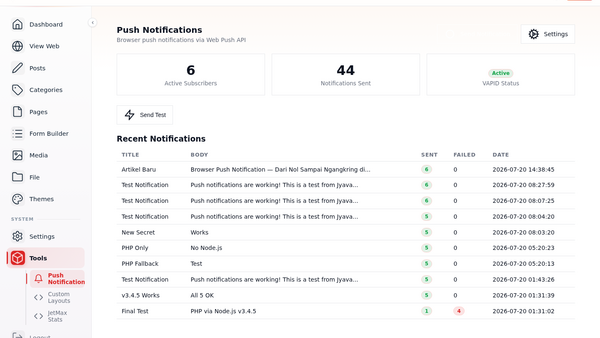
On the CMS dashboard, there is a Push Notification page that displays statistics: number of active subscribers, notification history, and a Send Test button for sending manual notifications. There is also a Settings page for configuring VAPID keys.
4. Dual Path Encryption
The feature I'm most proud of: the plugin automatically detects whether Node.js is available or not. If there is, use the web-push library (which has been tested). If it doesn't exist (for example shared hosting like Hostinger), it automatically falls back to PHP curl + custom encryption. Both produce valid encrypted payloads — tested across all 5 push services (Apple APNs, Google FCM, Microsoft WNS, Mozilla Autopush, and Samsung).
The Exhausting Journey of Debugging
This is the part I remember the most. When I first tested it, I sent a notification to my iPhone — the server returned "sent: 5, failed: 0". But the notification doesn't appear. I think it's a browser or OS problem. It turns out...
- First: The VAPID key lacks the prefix
0x04(uncompressed EC point). Fix: regenerate key. - Second:
openssl_pkey_get_private()needs PEM format, not rawdvalue. Fix: save private key as PEM in database. - Third: AAD is empty. Fix: added AAD as per RFC 8188.
- Fourth: Apple APNs need the
Content-Encoding: aes128gcmheader. Fix: added header. - Fifth: the
web-pushv3.6.7 library has a connection regression to Apple APNs (ETIMEDOUT). Fix: pin to v3.4.5 + set--dns-result-order=ipv4first.
Imagine, five different bugs that prevent notifications from appearing. And each one took hours to debug. But when I finally saw the "Node.js Test" notification appear on my iPhone, I felt... really satisfied.
Installation and Configuration
This plugin is available on Jyavani Plugin Store and GitHub. How to install:
# 1. Download atau clone dari GitHub
git clone https://github.com/adammuizweb/browser-push.git
cp -r browser-push /var/www/anda/plugins/browser-push

# 2. Install Node.js dependencies (opsional, untuk encryption path yang lebih reliable)
cd plugins/browser-push && npm install

# 3. Generate VAPID keys
php plugins/browser-push/generate-vapid.php

# 4. Tambahkan VAPID keys ke database
#    push_vapid_public_key, push_vapid_private_key, push_vapid_subject

# 5. Aktifkan plugin dari Admin → Plugin Manager
If you don't have Node.js on the server, no problem. The plugin still runs using PHP fallback — all the features are the same, only the encryption path is different.
Conclusion
Building this push notification browser plugin was one of the most intense coding experiences I've ever had. Not because it's logically complex, but because the Web Push encryption standard is very strict — one wrong byte, all browsers reject it.
Now this plugin has been tested on five different push services, supports dual path (Node.js + PHP), and most importantly: really works. You can see for yourself how it works by subscribing via the widget in the sidebar of this article — click Subscribe, allow notifications, and you will get a notification every time there is a new article.
The source code for this plugin is open source on GitHub, please fork, customize, or report the issue. If you have any questions, write them in the comments.